Updated
Scan a restaurant menu and find your dish
Palytt is a free menu scanner app for iPhone and iPad. Photograph a menu or paste its text, tell Palytt the restaurant, and see its dishes ranked with match scores and reasons. You can start from Home or a restaurant's Order Guide. Android is coming.
Use the menu in front of you. Palytt does not promise that an online menu, price or dish is current at every restaurant.
Android is coming. Get Android updates.
See what is on this menu, then choose what fits your taste.
How does the menu scanner work?
Show it the menu
Open Menu lens from Home or a restaurant's Order Guide. Take a photo, choose one from your library, or paste menu text. Enter the restaurant name if you started from Home.
Check the text
Palytt reads text from the photo on your iPhone. Review what it found and correct it by pasting menu text if a blurry photo or unusual layout was hard to read.
Compare the dishes
Analyze the menu to see recognized dishes ranked by match score, with short reasons and the evidence available for each pick. You can scan another menu when you are done.
What do the results look like?
Menu lens starts with the dishes it can read from the menu you supplied. It shows a ranked list and a short explanation for the strongest pick. When you have saved, rated or posted dishes, those signals can make the suggestions more personal.
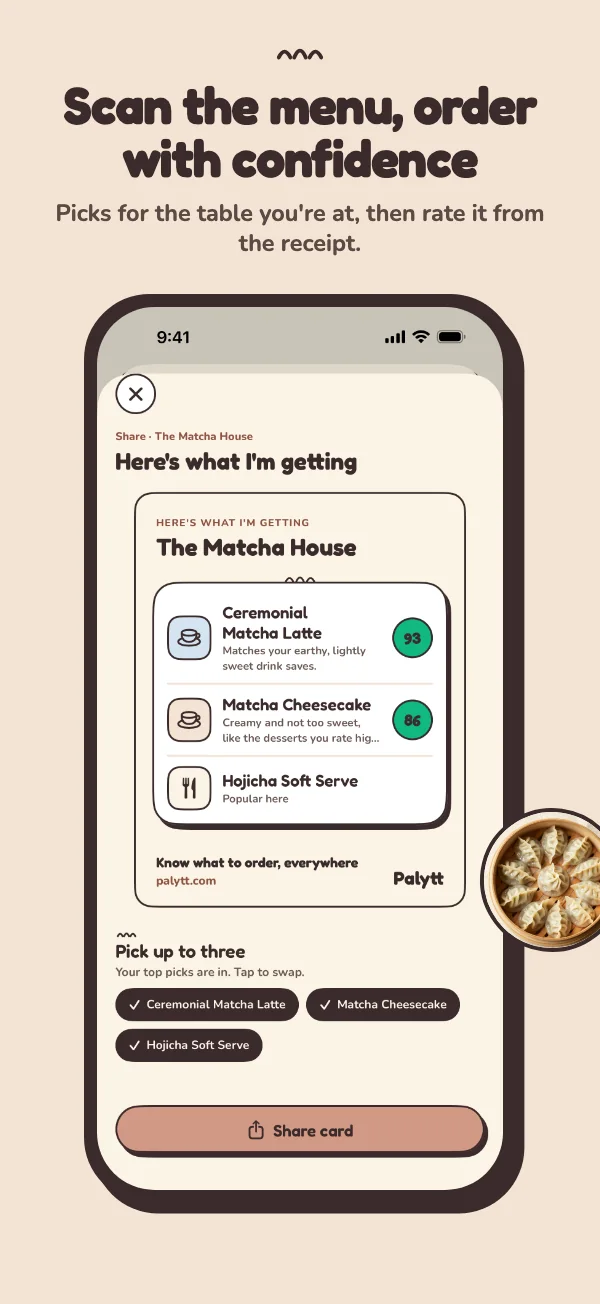
The example at right shows an order card made after choosing dishes in the iPhone app. It uses sample restaurant data; actual menu scans depend on the text Palytt can read and the information it has about your taste.
Already browsing a restaurant in Palytt? Open its Order Guide first. When that guide has few diner verdicts or uses an online menu, the menu scan helps you check what is on the table today.
When should you use it?
A new place with a long menu
Scan the printed menu to narrow the choices while you are at the table. It is especially useful when Palytt has not collected many dish posts for that restaurant yet.
A menu that may have changed
A restaurant's online menu may be old. Scanning the current menu gives Palytt today's dish names to consider, but ask the restaurant to confirm availability, prices and ingredients.
What are the limits?
A clear photo of readable text works best. Glare, handwriting, tiny type and complex layouts can cause missed or misread dishes. Palytt's scores are suggestions, not allergy, nutrition or medical advice. It cannot verify ingredients or make a restaurant's menu and prices live. If a dietary restriction matters, confirm it with the staff before ordering.
Want to understand where the scores come from? Read how taste matching works. For other ways to choose, compare the apps that help you know what to order.
Good to know
Can an app scan a restaurant menu and recommend a dish?
Yes. Palytt reads a photo of the menu in front of you, or text you paste, and ranks the dishes it recognizes. It shows match scores and short reasons using the taste information available to it. See how taste matching works.
Do I need to take a menu photo?
No. You can paste menu text instead. If a photo is blurry or the layout is hard to read, correct the recognized text before analyzing it.
Does it work when the restaurant has no menu online?
Yes. You can enter the restaurant name and use the printed menu at your table. Palytt needs readable menu text and a connection to analyze it; the restaurant does not need a published online menu.
Can I use the scanner for allergies or nutrition?
No. Palytt does not verify ingredients, allergens, calories, prices or current availability. Check dietary needs and the final order with the restaurant.
Is the menu scanner available on Android?
Palytt is available for iPhone and iPad today. Android is coming; you can get Android updates on the app page.
Related reading
- How to decide what to order at a restaurantStart with what you know you love, find the dishes the kitchen is known for, and order the one in both groups. A practical method for any menu.
- How to find the best dish at a restaurant you've never been toLook for the dish that reviews, photos, food writers and friends keep naming, check it against your taste, and confirm it with your server.
More Palytt guides
Bring the menu.
Find your dish.
Download on the App StoreFree on iPhone and iPad; Android is coming
Android is coming. Get Android updates.